Contents
What is cloud computing?
Cloud computing is the on-demand delivery of compute power, database, storage, applications, and other IT resources through a cloud services platform via the internet with pay-as-you-go pricing.
- On-demand self-service
- Access to the network
- Resource pooling
- Elasticity
- Resource usage monitored and billed
Six advantages of cloud computing
-
Trade fixed expense for variable expense – Instead of having to invest heavily in data centers and servers before you know how you’re going to use them, you can pay only when you consume computing resources, and pay only for how much you consume.
-
Benefit from massive economies of scale – By using cloud computing, you can achieve a lower variable cost than you can get on your own. Because usage from hundreds of thousands of customers is aggregated in the cloud, providers such as AWS can achieve higher economies of scale, which translates into lower pay as-you-go prices.
-
Stop guessing capacity – Eliminate guessing on your infrastructure capacity needs. When you make a capacity decision prior to deploying an application, you often end up either sitting on expensive idle resources or dealing with limited capacity. With cloud computing, these problems go away. You can access as much or as little capacity as you need, and scale up and down as required with only a few minutes’ notice.
-
Increase speed and agility – In a cloud computing environment, new IT resources are only a click away, which means that you reduce the time to make those resources available to your developers from weeks to just minutes. This results in a dramatic increase in agility for the organization, since the cost and time it takes to experiment and develop is significantly lower.
-
Stop spending money running and maintaining data centers – Focus on projects that differentiate your business, not the infrastructure. Cloud computing lets you focus on your own customers, rather than on the heavy lifting of racking, stacking, and powering servers.
-
Go global in minutes – Easily deploy your application in multiple regions around the world with just a few clicks. This means you can provide lower latency and a better experience for your customers at minimal cost.
Types of cloud computing
Cloud
A cloud-based application is fully deployed in the cloud and all parts of the application run in the cloud. Applications in the cloud have either been created in the cloud or have been migrated from an existing infrastructure to take advantage of the benefits of cloud computing. Cloud-based applications can be built on low-level infrastructure pieces or can use higher level services that provide abstraction from the management, architecting, and scaling requirements of core infrastructure.
Private cloud (on-premises)
The deployment of resources on-premises, using virtualization and resource management tools, is sometimes called the private cloud. On-premises deployment doesn’t provide many of the benefits of cloud computing but it is sometimes sought for its ability to provide dedicated resources. In most cases, this deployment model is the same as legacy IT infrastructure while using application management and virtualization technologies to try and increase resource utilization.
Hybrid
A hybrid deployment is a way to connect infrastructure and applications between cloud-based resources and existing resources that are not located in the cloud. The most common method of hybrid deployment is between the cloud and existing on-premises infrastructure to extend, and grow, an organization’s infrastructure into the cloud while connecting cloud resources to the internal system. For more information on how AWS can help you with your hybrid deployment, visit our AWS Solutions for Hybrid and Multicloud page.
Global infrastructure
The AWS Cloud infrastructure is built around AWS Regions and Availability Zones. An AWS Region is a physical location in the world where we have multiple Availability Zones. Availability Zones consist of one or more discrete data centers, each with redundant power, networking, and connectivity, housed in separate facilities. These Availability Zones offer you the ability to operate production applications and databases that are more highly available, fault tolerant, and scalable than would be possible from a single data center.
High availability
Designing for High availability means designing for minimal downtime.
Fault tolerance
Designing for Fault tolerance means designing for zero downtime.
Disaster recovery
Designing for Disaster recovery means designing for systems to operate through a disaster.
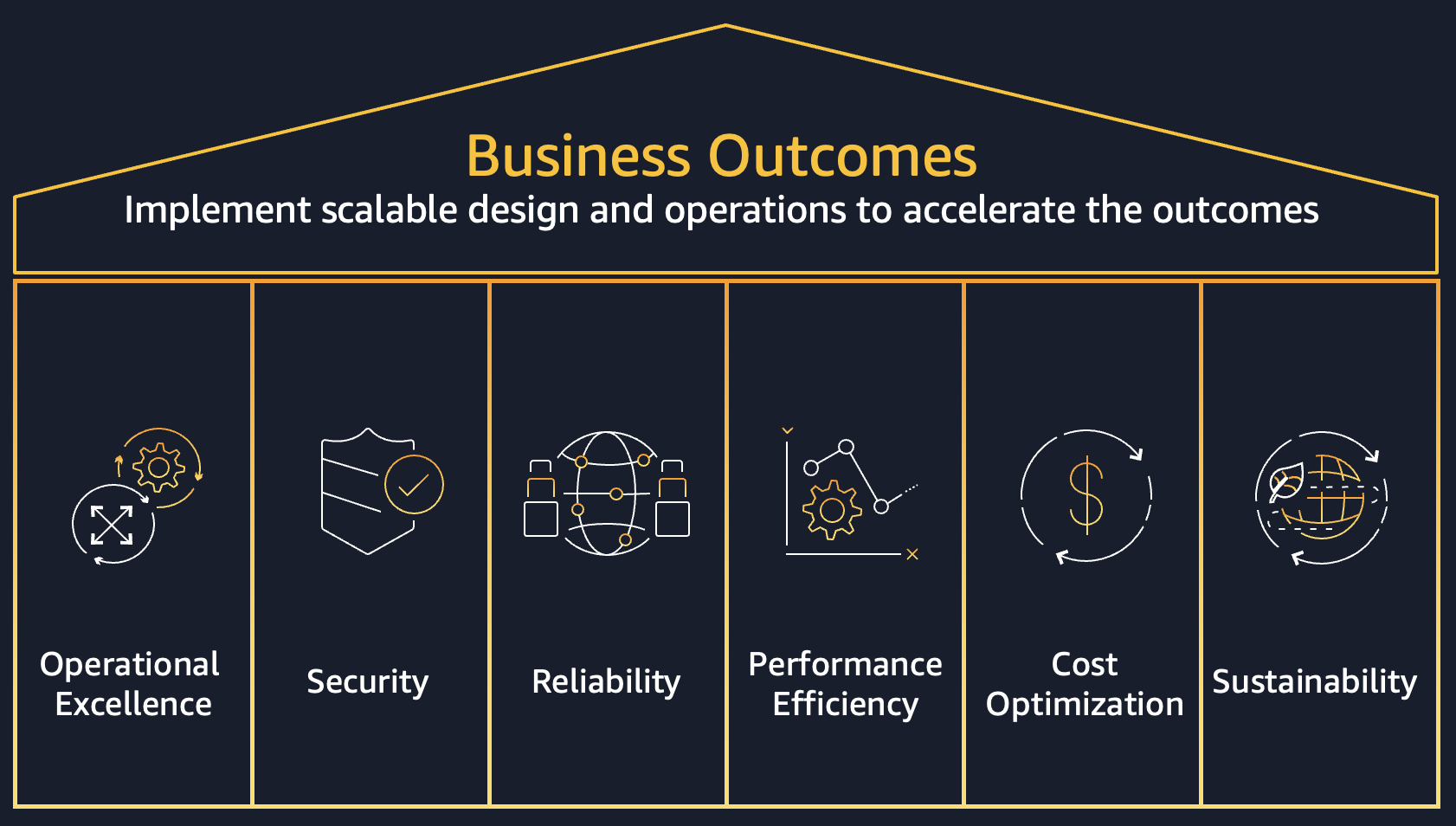
AWS Well-Architected framework
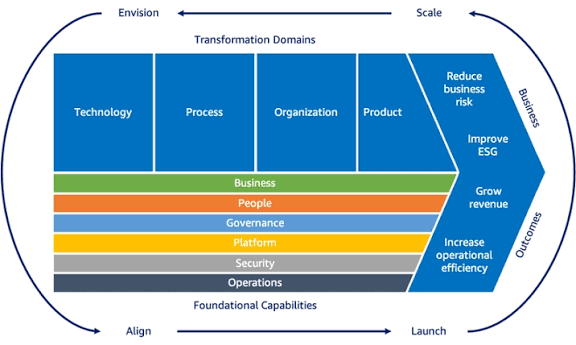
AWS Cloud Adoption Framework
Migration strategies (7 Rs)
There are seven migration strategies for moving applications to the cloud, known as the 7 Rs:
-
Retire
-
Retain
-
Rehost
-
Relocate
-
Repurchase
-
Replatform
-
Refactor or re-architect
Retire
This is the migration strategy for the applications that you want to decommission or archive. Retiring the application means that you can shut down the servers within that application stack.
Retain
This is the migration strategy for applications that you want to keep in your source environment or applications that you are not ready to migrate. You might choose to migrate these applications in the future.
Rehost
This strategy is also known as lift and shift. Using this strategy, you move your applications from your source environment to the AWS Cloud without making any changes to the application. For example, you migrate your application stack from on-premises to the AWS Cloud.
Relocate
Using this strategy, you can transfer a large number of servers, comprising one or more applications, at a given time from on-premises platform to a cloud version of the platform. You can also use the relocate strategy to move instances or objects to a different virtual private cloud (VPC), AWS Region, or AWS account.
Repurchase
This strategy is also known as drop and shop. You replace your application with a different version or product. The new application should provide more business value than the existing, on-premises application, including features such as accessibility from anywhere, no infrastructure to maintain, and pay-as-you-go pricing models. Repurchasing the application typically reduces costs associated with maintenance, infrastructure, and licensing.
Replatform
This strategy is also known as lift, tinker, and shift or lift and reshape. Using this migration strategy, you move the application to the cloud, and you introduce some level of optimization in order to operate the application efficiently, to reduce costs, or to take advantage of cloud capabilities. For example, you might replatform a Microsoft SQL Server database to Amazon RDS for SQL Server.
Refactor or re-architect
Using this strategy, you move an application to the cloud and modify its architecture by taking full advantage of cloud-native features to improve agility, performance, and scalability. This is driven by strong business demand to scale, accelerate product and feature releases, and to reduce costs.